01 _ overview
A week lost to the same problem in every sprint
Redesigning the POS system required documenting the responsive behavior and accessibility requirements of every component before the development handoff.
Manually calculating viewport units, checking color contrast, and formatting specifications for developers was a repetitive task that resurfaced every sprint for each new or updated component.
On large projects, this step alone consumed nearly a full week of the design team's time. A week spent on documentation while the sprint waited.
~1 week
Documentation time per major delivery (before the tool)
Every sprint
How often the problem reoccurred
A tool built by the team, for the team experiencing the problem.
02 _ the problem
Manual, repetitive, and prone to human error.
The documentation workflow involved:
Opening the frame in Figma manually
Recording every width, height, padding, spacing, and icon size
Manually converting values into viewport units (vw/vh) and rem
Checking the contrast ratio for every foreground/background color pair using external tools
Formatting all of this into documentation that developers could easily understand
Even native Figma plugins were tested, but none solved the problem end to end. When a developer needed to verify a specific component value, updating the documentation, validating the information, and confirming the correct value could take up to an hour.
The entire process was repetitive, making it inherently prone to mistakes. A single incorrect calculation at the beginning of a sprint could easily turn into rework by the end of it.
How might we eliminate manual documentation time without sacrificing accuracy and do it directly within Figma, without disrupting the team's existing workflow?
03 _ proccess
The solution was the API.
The challenge was the prompt.
The idea emerged after realizing that all the necessary information already existed in Figma. The real problem was extracting, calculating, and formatting that data.
The approach was to build an automation layer with Figma Make that connected directly to the Figma API, extracting layout data from a selected frame and automatically applying viewport calculations and color contrast validation.
It's worth noting that this project began well before MCPs (Model Context Protocol servers) became widely available in today's leading AI agents. A fast, practical solution was needed, and Figma already provided the connectors required to build it.
The biggest challenge, however, was writing design-oriented prompts that could guide the tool to understand not only the component values but also the design logic behind them. The goal wasn't simply to generate documentation, it was to make the tool document and reason like a designer.
01
Diagnosis
Mapped the manual documentation workflow to identify where time was being lost and where errors occurred most frequently.
02
Exploration
Evaluated native Figma plugins, but ruled them out because they did not cover the full scope of the problem.
03
Prototyping
Built the first version using Figma Make and the Figma API to extract layout data and automate viewport calculations.
04
Refinement
Iterated on design-oriented prompts to produce documentation that was accurate, structured, and easy for developers to consume.
05
Adoption
Integrated the tool into the team's recurring workflow, where it became part of every sprint delivery.
04 _ solution
Select the frame. Run the tool. Documentation ready.
The generator acts as a translation layer between design and development, automating repetitive work so designers can spend more time on what truly matters: creating.
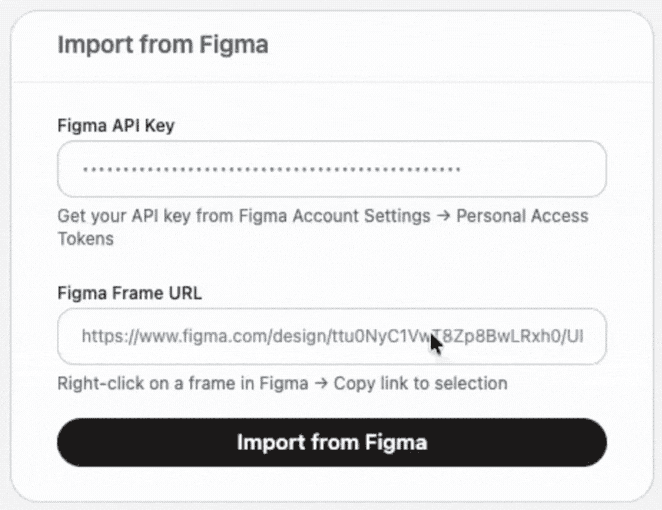
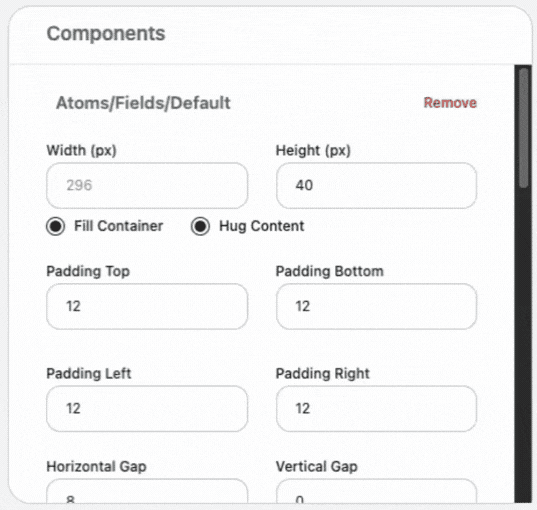
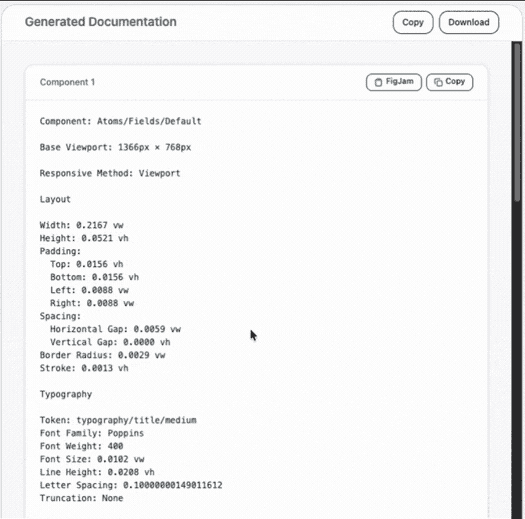
Tool in action: extraction, calculation, and documentation output in under 5 minutes.
05 _ result
From one week to two days. From one hour to five minutes.
The tool was integrated into the team’s recurring workflow and has been actively used in every sprint since then.
The impact was felt not only in delivery speed, but also in the team’s overall capacity. Instead of getting stuck in documentation work, the design team was able to deliver both projects and their supporting documentation within the same sprint cycle.
BEFORE
Complete documentation per major delivery: ~1 week
Single component verification: ~1 hour
Process: manual, linear, and dependent on continuous attention
Risk: human error in repetitive calculations
Sprint impact: recurring delivery delays
AFTER
5× faster
complete documentation per major delivery (1 week → 2 days)
12× faster
for single-component verification (1 hour → 5 minutes)
Everything runs within the Figma ecosystem.